
Folderize
Hierarchical Folder-Based Document & File Management for Salesforce
Transform the way your organization manages, discovers, and shares Salesforce Files with an intuitive, nested folder hierarchy inside Lightning, Classic, and Experience Cloud.
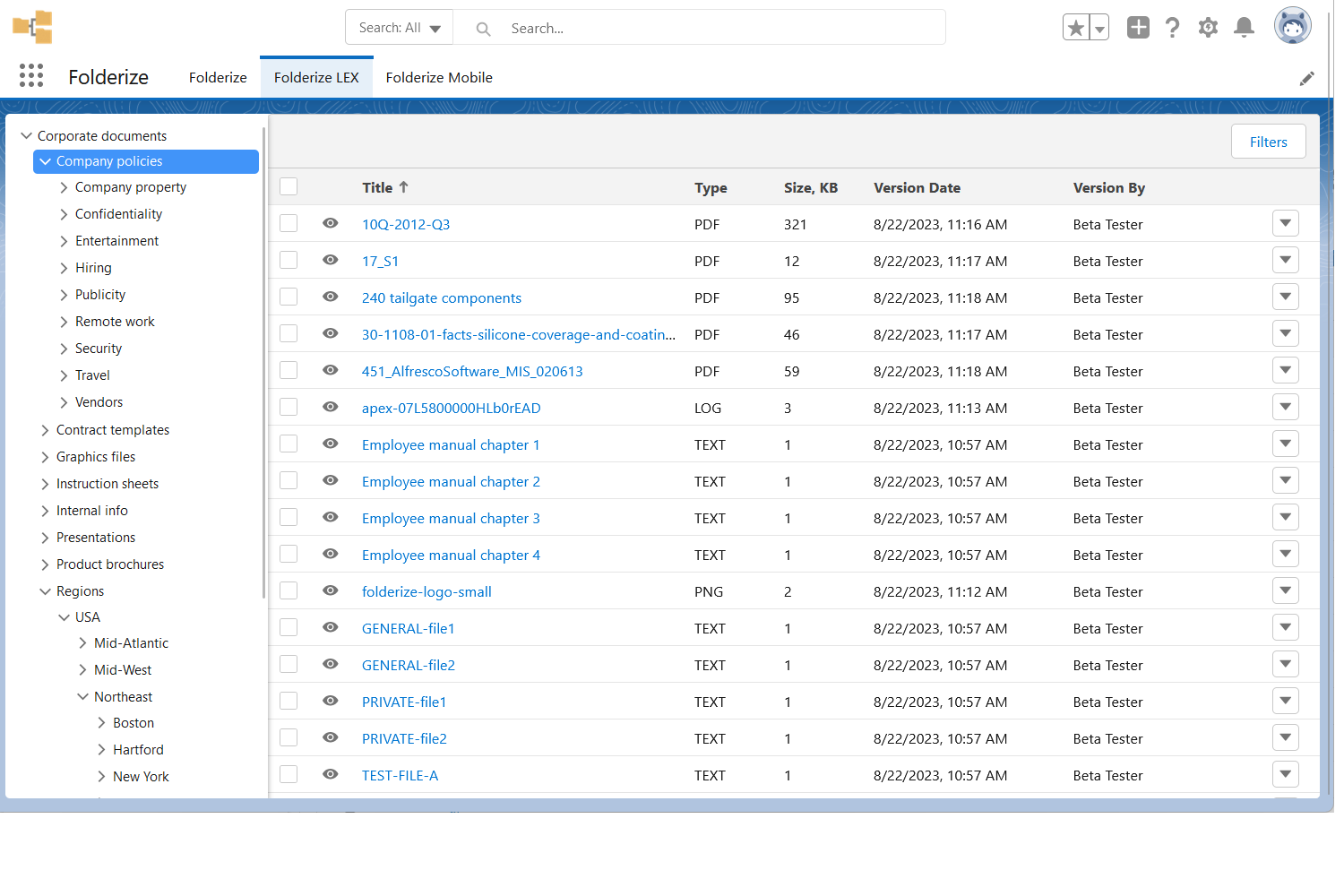
Engineered for Performance & Simplicity
Explore why leading organizations rely on Folderize to maximize productivity across their Salesforce orgs.
Nested Hierarchical Folders
Create unlimited sub-folders to organize documents just like Windows File Explorer or macOS Finder directly inside Salesforce.
Experience Cloud (Communities)
Expose organized folder structures to partner portals, client communities, and external stakeholders securely.
Mass File Operations
Perform bulk operations: mass delete, bulk moving between folders, batch tagging, and multi-file downloads in a single click.
Full-Text & Tag Search
Instantly filter within specific folders or search across the entire directory structure with instant keyword matching.
Salesforce Mobile App
Browse, view, and share folderized documents on iOS and Android devices through the native Salesforce Mobile app.
Bulk Folder & File Upload
Drag-and-drop entire desktop folders with nested subdirectories directly into Salesforce without losing structure.
Up and Running in 3 Simple Steps
Install Folderize
Install from the AppExchange and add the Folderize Lightning Component to any app or page layout.
Create Your Folder Tree
Build intuitive nested folders for departments, clients, projects, or compliance documentation.
Organize & Share
Organize existing Salesforce Files, enable Experience Cloud portals, and manage documents with mass action tools.
Choose the Right Edition for Your Team
Every MK Partners application offers three tailored editions: Free, Full Speed, and Performance.
Free Forever
Basic folder management for small teams managing up to 500 Salesforce files.
Standard Edition on AppExchange.
What's included:
- Visual hierarchical folder tree structure
- Organization-wide file and folder sharing
- Salesforce Classic & Lightning support
- Manage up to 500 files
- Standard folder search and filtering
- Uses native Salesforce Files storage
- Standard online documentation
Full Speed
Manage unlimited files with mass actions, mobile app support, and Experience Cloud portals.
Billed annually. Unlimited files.
What's included:
- Everything in Free Edition
- Manage UNLIMITED files (surpasses 500 file limit)
- Mass delete, move, and tag operations
- Salesforce Mobile App support
- Experience Cloud (Community & Portal) support
- Custom folder icons and color-coding
- Direct URL deep-linking to specific folders
- Standard email & ticket support
Performance
Bulk desktop folder uploads, custom integrations, granular permissions, and dedicated account manager.
Volume pricing & custom enterprise deployments.
What's included:
- Everything in Full Speed Edition
- Bulk upload entire desktop folder hierarchies and files
- Granular folder-level security and permission profiles
- Custom integration assistance & automated folder routing
- Dedicated Account Manager & onboarding consultation
- Volume license discounts for enterprise deployments
- Priority SLA support & quarterly review calls
Feature Comparison Matrix
Compare capabilities across Free, Full Speed, and Performance editions of Folderize.
| Feature | Free | Full Speed | Performance |
|---|---|---|---|
| File Capacity & Operations | |||
| Hierarchical Folder Tree | ✔ | ✔ | ✔ |
| Maximum Managed Files | Up to 500 Files | Unlimited | Unlimited |
| Mass Delete & Move Files | — | ✔ | ✔ |
| Bulk Upload Desktop Folders | — | — | ✔ |
| Environments & Experience Cloud | |||
| Salesforce Lightning & Classic | ✔ | ✔ | ✔ |
| Salesforce Mobile App | — | ✔ | ✔ |
| Experience Cloud (Communities & Portals) | — | ✔ | ✔ |
| Granular Security & Permissions Profiles | — | — | ✔ |
| Dedicated Account Manager | — | — | ✔ |
Trusted by Salesforce Professionals
Read what real admins and business leaders say about Folderize.
"Folderize solves our file management problems, making it very easy to locate and organize all of the documents we use on a regular for our 140+ recipient organizations."
"Fills an important need and also good support."
Frequently Asked Questions
Have questions about Folderize licensing, installation, or editions?
Does Folderize duplicate my Salesforce files? +
What happens if I exceed 500 files on the Free edition? +
Can I use Folderize on external Experience Cloud portals? +
Ready to Experience Folderize?
Install the Free edition today or choose Full Speed for advanced automation and premium features.
Compare Editions & Get Started