
Mambo Merge
The Fastest, 100% Salesforce Native Document Generation Solution
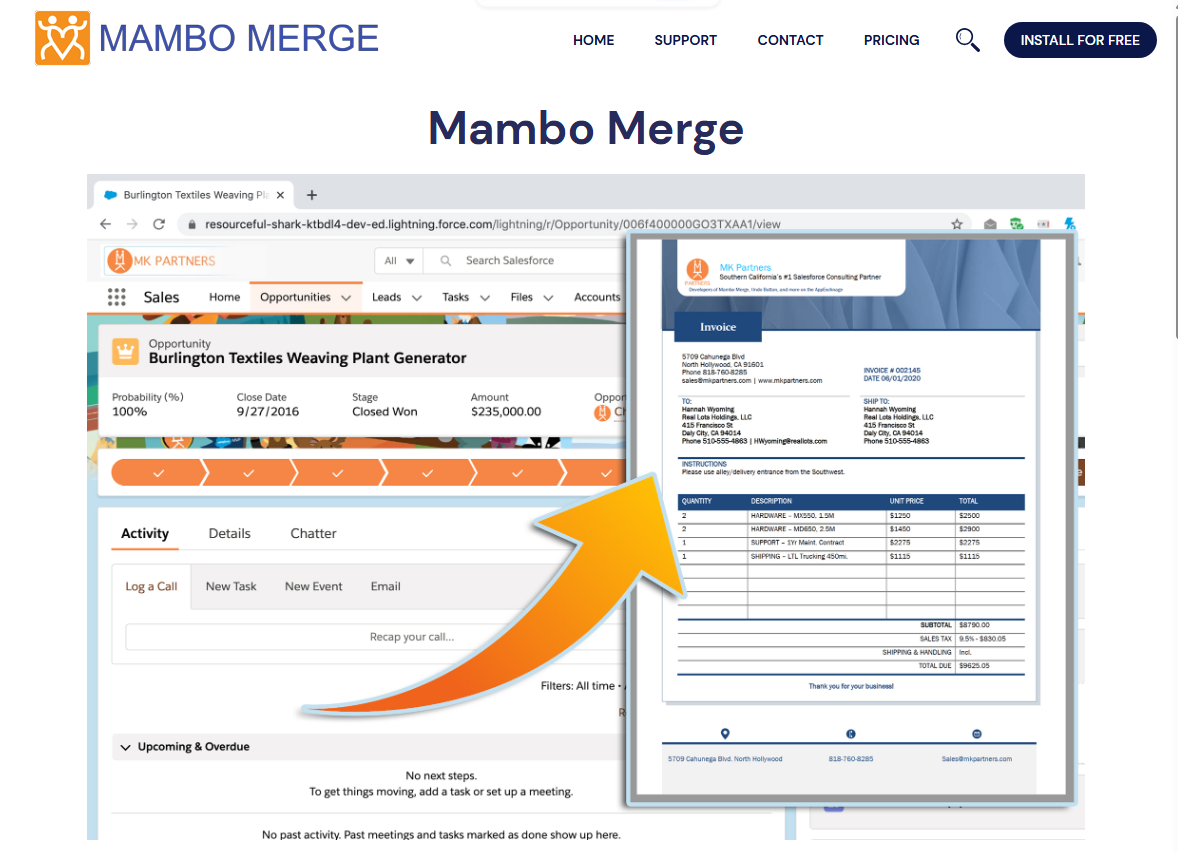
Generate pixel-perfect quotes, invoices, proposals, letters, and reports directly from Salesforce records with precision, control, and zero data leaving your Salesforce trust boundary.
Engineered for Performance & Simplicity
Explore why leading organizations rely on Mambo Merge to maximize productivity across their Salesforce orgs.
Multi-Format Document Support
Generate documents in DOCX, PPTX, XLSX, and high-resolution PDF formats with complete style and layout fidelity.
100% Salesforce Native
Your sensitive data never touches a third-party server or external API. Merge operations occur entirely within your Salesforce instance.
Automate with Flow & Apex
Trigger document generation automatically from Screen Flows, Record-Triggered Flows, or custom Apex classes without user intervention.
Related Lists & Child Records
Effortlessly pull Line Items, Contacts, Case Comments, or any child relationship data into clean dynamic tables.
Backup Dancers Automation
Chain post-merge actions automatically: update record fields, log completed tasks, email the generated file, or launch follow-up flows.
WYSIWYG & HTML Merge
Design rich templates with an in-app HTML editor, merge rich-text fields, and generate dynamic emails or watermarked PDFs.
Up and Running in 3 Simple Steps
Upload Your Template
Build your template in Microsoft Word, Excel, PowerPoint, or HTML using standard merge field tags, then upload it into Salesforce Files.
Drop the Component on Any Record
Add the Mambo Merge Lightning Web Component to any standard or custom object page in Lightning App Builder with point-and-click ease.
Generate & Automate
Click to generate instant documents or automate end-to-end via Salesforce Flows, attaching merged files directly to records or sending via email.
Choose the Right Edition for Your Team
Every MK Partners application offers three tailored editions: Free, Full Speed, and Performance.
Free Forever
Essential document generation for individuals and small teams needing quick Word template merges.
No credit card required. Free on AppExchange.
What's included:
- Standard .docx template generation
- 100% Salesforce Native (no external servers)
- Lightweight footprint inside your org
- Supports Standard and Custom Objects
- Source templates directly from FILES tab
- Download merged documents directly to PC
- Standard merge fields and basic table loops
- Community documentation & user guides
Full Speed
Complete document automation across PDF, Word, PowerPoint, and Excel with Salesforce Flow integration.
Billed annually. Minimum 1 user.
What's included:
- Everything in Free Edition
- Full format support: DOCX, PPTX, XLSX, and PDF
- Save merged documents to Salesforce Records & Libraries
- Dynamic custom file naming with merged variables
- Automate merges via Salesforce Flows & Apex
- Bulk record generation (merge multiple records at once)
- Advanced logic: String, Date, Logic, Image, and Math functions
- Backup Dancers: update records, save tasks, trigger flows
- Custom SOQL queries & Salesforce Report data sources
- Large file handling & multi-page document scaling
- Standard email & web support
Performance
Enterprise power with HTML templates, PDF combining, watermarking, security passwords, and 4-hour SLA.
Billed annually. Minimum 50 user licenses.
What's included:
- Everything in Full Speed Edition
- HTML format support & built-in WYSIWYG editor
- Combine & stitch multiple PDFs into a single file
- Watermarked and Password-Protected PDFs
- Salesforce Email Relay & custom SMTP integration
- Native high-volume delivery via SendGrid, MailGun & MailJet
- Enterprise concurrency & priority queue processing
- Dedicated Developer Support & 4-Hour Response SLA
Feature Comparison Matrix
Compare capabilities across Free, Full Speed, and Performance editions of Mambo Merge.
| Feature | Free | Full Speed | Performance |
|---|---|---|---|
| Supported Formats | |||
| Microsoft Word (.docx) | ✔ | ✔ | ✔ |
| Adobe PDF (.pdf) | — | ✔ | ✔ |
| Microsoft Excel (.xlsx) | — | ✔ | ✔ |
| Microsoft PowerPoint (.pptx) | — | ✔ | ✔ |
| HTML & In-App WYSIWYG Editor | — | — | ✔ |
| Storage & Automation | |||
| Download Merged Documents to PC | ✔ | ✔ | ✔ |
| Save Directly to Salesforce Records | — | ✔ | ✔ |
| Save to Salesforce Libraries / Files | — | ✔ | ✔ |
| Dynamic Custom File Naming | — | ✔ | ✔ |
| Salesforce Flow & Apex Automation | — | ✔ | ✔ |
| Bulk / Multi-Record Merging | — | ✔ | ✔ |
| Backup Dancers (Auto-Tasks, Updates, Follow-up) | — | ✔ | ✔ |
| Custom SOQL Queries & Reports as Data | — | ✔ | ✔ |
| Enterprise & Security | |||
| 100% Native Architecture | ✔ | ✔ | ✔ |
| Combine Multiple PDFs into One | — | — | ✔ |
| Watermarked & Password Protected PDFs | — | — | ✔ |
| Email Delivery via MailGun / SendGrid / MailJet | — | — | ✔ |
| Support Response SLA | Community | Next Business Day | 4-Hour SLA |
Trusted by Salesforce Professionals
Read what real admins and business leaders say about Mambo Merge.
"Mambo Merge has been an outstanding solution for our nonprofit organization, significantly improving how we generate donor acknowledgments, letters, and Salesforce-based documents."
"Mambo Merge has been an incredible enhancement to our data operation processes!"
Frequently Asked Questions
Have questions about Mambo Merge licensing, installation, or editions?
Does Mambo Merge send any data outside Salesforce? +
Can I try Full Speed before buying? +
How do licenses work? +
Can Mambo Merge merge child records and related lists? +
Ready to Experience Mambo Merge?
Install the Free edition today or choose Full Speed for advanced automation and premium features.
Compare Editions & Get Started